
Multi-Account vs. Tag-Based Cost Allocation: When Account Boundaries Beat Tags
Tags fail at shared infrastructure. Account boundaries force the conversation. Here's the framework we use to decide when to split into separate AWS accounts and when tagging is still the right answer.
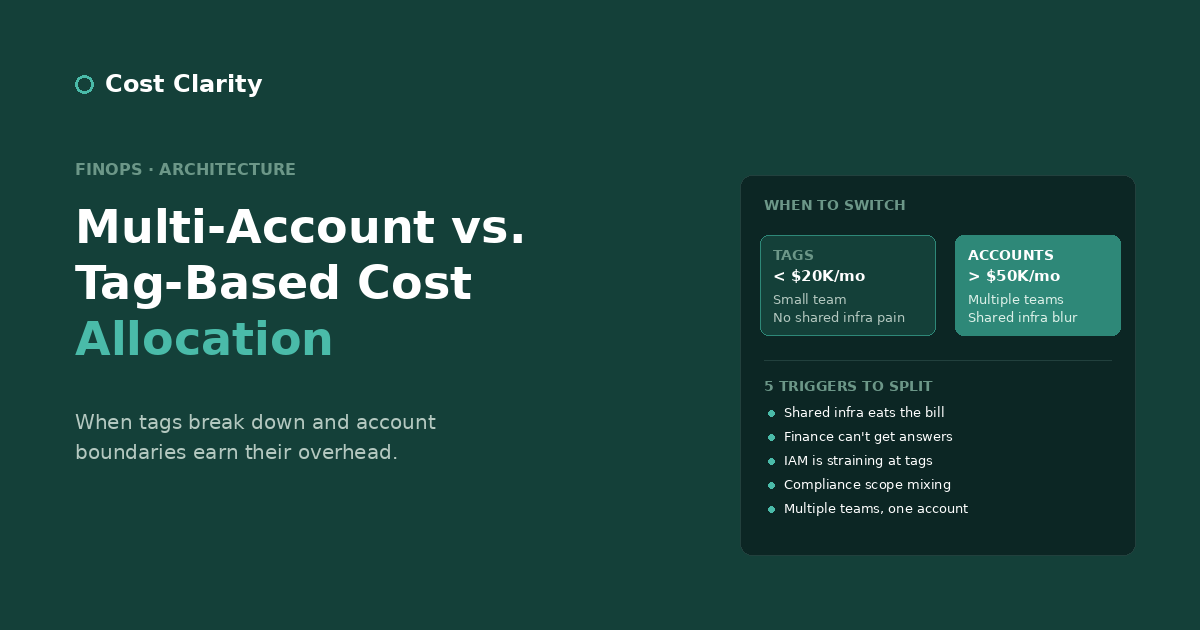
There's a recurring conversation in AWS architecture circles that goes something like this: a team starts with a single AWS account, sets up cost allocation tags, and everything works. Then the company grows. The number of services multiplies. Shared infrastructure—databases, load balancers, NAT Gateways, logging pipelines—starts to dominate the bill. The tagging strategy that worked at 5 services starts producing cost reports nobody trusts at 50.
At some point, the obvious question surfaces: should we split into separate AWS accounts per team, per service, or per environment?
The answer is: yes, eventually, for the right reasons. Multi-account strategies aren't really about cost allocation, even though that's often the trigger that forces the conversation. They're about scoping responsibility, blast radius, and access control. Cost attribution gets cleaner as a side effect, which is why teams reach for accounts when their tagging strategy starts breaking down.
This post is the framework we use to decide when account boundaries are worth the operational overhead, and when staying on tags is still the right answer.
What Tagging Actually Solves (and What It Doesn't)
A well-implemented tagging strategy with three required tags—Environment, Service, Team—gets you a long way. We wrote about how to make that work in AWS Cost Allocation Tagging: Beyond "Just Tag Everything". You can answer questions like "how much did payment-processor cost last month" or "what fraction of our spend is non-production." The compliance burden is manageable. New engineers can be onboarded onto the conventions in an afternoon.
What tagging doesn't cleanly solve is shared infrastructure. The list is longer than most teams expect:
- Application Load Balancers serving multiple services
- NAT Gateways routing traffic for everything in a VPC
- VPC Flow Logs and centralized CloudWatch log groups
- Shared Redis or ElastiCache clusters used by half the platform
- RDS instances hosting databases for several services
- S3 buckets with mixed-purpose contents (logs from one service, assets from another)
- Internal CloudTrail trails that exist once at the org level
You can tag these resources, but the tag answers the wrong question. Service:platform on a NAT Gateway tells you "platform team owns it"—it doesn't tell you which application services are responsible for the data processing fees this month.
AWS offers split cost allocation tags as a partial solution, but the implementation cost in our experience exceeds the value for environments under roughly $50K/month in shared resource cost. Below that threshold, you can tag with the primary consumer, document the imperfection, and move on. Above that, you're starting to face a real choice.
Why Account Boundaries Change the Conversation
Here's the structural difference: tags are metadata layered on top of resources. Account boundaries are physical separation. Once a service lives in its own AWS account, every resource it uses is automatically attributable to it. There's no shared NAT Gateway question because the NAT Gateway is in that account. There's no "which team's ALB is this" question because the ALB is in the account that owns the workload.
The trade-off is that anything genuinely shared—identity, networking, observability—now requires explicit cross-account work. Accounts force you to make sharing decisions deliberate instead of accidental.
This is why account-per-service is often described as a "cost attribution hack that happens to improve security." The security benefits are real (smaller blast radius, cleaner IAM, easier compliance scoping), but for many teams, the cost attribution is the trigger. The security improvements are a bonus you collect for free.
When to Split: Five Triggers
We don't recommend a specific monthly spend number as a single threshold. We do recommend a set of triggers. If two or more are true, it's time to plan the split.
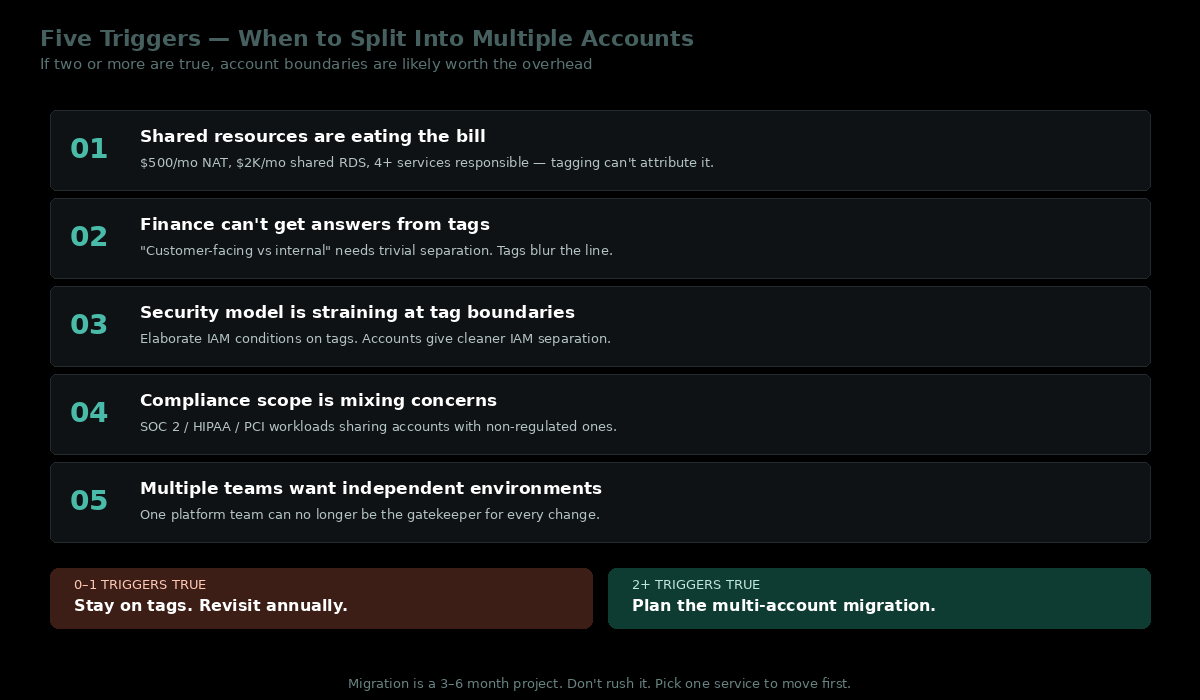
1. You have shared resources that are becoming a meaningful share of your bill.
If a single NAT Gateway is generating $500/month in data processing fees and four services are responsible for that traffic, the cost attribution question matters. If your shared RDS instance is $2,000/month and serves six different applications, you can no longer answer "what does service X cost" without elaborate query work.
2. Your finance or FinOps function is asking questions your tags can't answer.
"What did we spend on customer-facing infrastructure last quarter, separated from internal tooling?" is hard to answer with tags if the boundary between them is blurry. It's trivial to answer if customer-facing infrastructure lives in distinct accounts.
3. Your security model is starting to strain.
If you're using IAM conditions to scope access by tags, and you've found yourself writing increasingly elaborate policies to enforce separation, accounts are the cleaner answer. IAM is more reliable at account boundaries than at tag boundaries.
4. Your compliance scope is mixing concerns.
If part of your environment is subject to compliance requirements (SOC 2, HIPAA, PCI) and part isn't, mixing them in a single account makes audit scope noisy. Accounts let you draw a clean line.
5. You're scaling past the team size where one platform team can manage everything.
When you have multiple engineering teams each owning their own services, account-per-team gives them their own playground without the friction of shared blast radius concerns.
Rough spend signal. Below $20K/month in total AWS spend, the operational overhead of multi-account typically exceeds the attribution benefit. Between $20K and $50K/month is a grey zone where the triggers above decide it. Above $50K/month, the math has usually flipped—at that point, the security and blast-radius arguments are pushing in the same direction as cost attribution, and the question is more when than whether.
The Costs of Multi-Account That Most Teams Underestimate
Account boundaries aren't free. The hidden costs:
Cross-account IAM complexity. Every cross-account access pattern needs an explicit role, trust policy, and access path. Done right (with AWS IAM Identity Center, formerly SSO, plus permission sets) it's manageable. Done ad-hoc, it becomes a maintenance burden that grows with every new account.
Networking overhead. If services in different accounts need to talk to each other, you're now in Transit Gateway, VPC peering, or PrivateLink territory. Each of these has a real monthly cost. A small environment can absorb $500–$1,000/month in additional networking cost just from going multi-account.
Duplicate baseline costs. Each account has its own minimum overhead: CloudTrail, AWS Config, default VPCs, monitoring. The first $50–$100/month per account is essentially fixed regardless of workload size. With 20 accounts, that's $1,000–$2,000/month before you've run any workloads.
Operational friction. Deploying to many accounts requires either a deployment tool that natively understands multi-account (CloudFormation StackSets, AWS CDK with cross-account support, Terraform with provider configurations per account) or a meaningful investment in glue. Onboarding new engineers takes longer because there are more environments to navigate.
Shared services still need to live somewhere. Identity, networking, and observability typically consolidate into dedicated "shared services" or "platform" accounts. Those need a clear ownership model, or they become the new place where attribution gets murky.
A Practical Account Structure
For teams crossing the threshold, the structure that has worked well in our experience follows the standard AWS Well-Architected pattern: three levels deep, with foundation accounts alongside a single Workloads OU that contains all the environment-specific OUs.
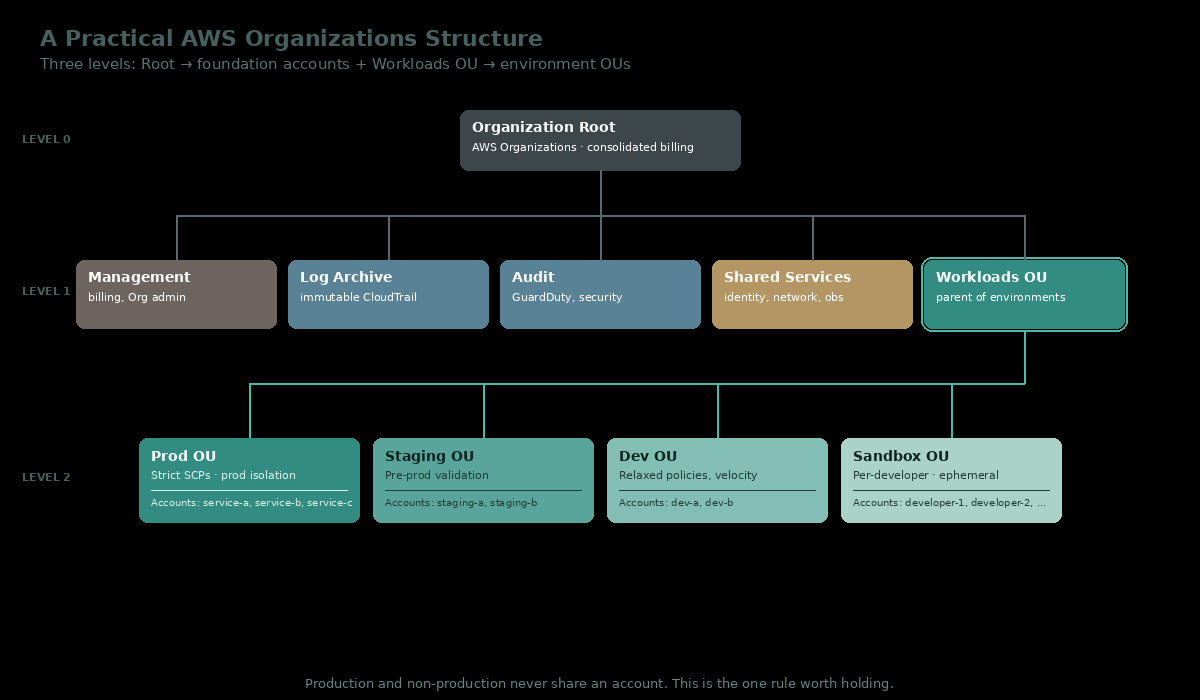
Level 0 — Organization Root. AWS Organizations management point, consolidated billing.
Level 1 — Foundation accounts + Workloads OU.
Management— billing and Org admin only. No workloads ever land here.Log Archive— immutable CloudTrail destination, write-only from member accounts.Audit— GuardDuty aggregation, security tooling.Shared Services— identity (IAM Identity Center), shared networking (Transit Gateway, private DNS), and centralized observability.Workloads OU— the parent OU for all environment-specific accounts. Service Control Policies attached here apply to everything beneath it.
Level 2 — Environment OUs (children of Workloads OU).
Prod OU— strict SCPs, production isolation. Contains the production accounts for each service (service-a-prod,service-b-prod, …).Staging OU— pre-prod validation. Looks like prod but is not prod.Dev OU— relaxed policies favoring iteration velocity.Sandbox OU— per-developer, ephemeral accounts. Time-bound, auto-cleaned, no production data.
The key principles:
- Production and non-production never share an account. This is non-negotiable. The blast radius and access control argument is strongest here.
- Service boundaries map to account boundaries for the services that justify it. Not every service needs its own account—a small internal tool can share an account with similar-scale tools.
- Sandbox accounts are cheap and ephemeral. Each developer should have one if your scale supports it. Time-bound, auto-cleaned, no production data, no shared services.
- Shared Services has clear ownership and limited scope. It exists to host things that genuinely must be shared. It is not where new services accidentally end up because nobody decided where they should live.
This is structural, not aspirational. AWS Organizations supports it natively. Service Control Policies (SCPs) attached to OUs enforce the rules: Prod OU accounts can't disable CloudTrail, Sandbox OU accounts can't create resources in production regions, non-prod accounts can't make calls to billing APIs.
Cost Allocation in a Multi-Account World
Once you're multi-account, the cost allocation question simplifies. AWS Cost Explorer and AWS Budgets natively support filtering and grouping by linked account. Your monthly cost review becomes:
- "How much did
service-a-prodcost?" → directly visible in the management account's billing view. - "How much is Shared Services costing each consumer service?" → still requires allocation logic, but now it's a single allocation problem against a known shared cost, not a dozen tagging questions.
- "What's our environment split?" → groupable by OU.
Tags still matter inside accounts, especially for distinguishing components within a service (e.g., Component:api vs. Component:worker inside service-a-prod). But the heaviest cost-attribution lifting is done by the account structure itself, which doesn't depend on tag compliance to work.
The Migration Path
Going from a single account to a multi-account structure is a real project, not a weekend. The order that minimizes risk:
- Stand up AWS Organizations with your existing account as the management account. (Or, if you're being thorough, create a new clean management account and move billing there—more work, cleaner long-term.)
- Create the foundational accounts first: Log Archive, Audit, Shared Services. These don't host workloads, but they establish the security baseline.
- Create the Workloads OU and its child environment OUs (Prod, Staging, Dev, Sandbox), but leave them empty initially.
- Create new workload accounts and migrate one service at a time. Don't try to move everything at once. Start with the service whose ownership is clearest and whose dependencies are simplest.
- Use AWS Application Migration Service or service-specific migration tools rather than custom scripts where possible.
- Plan for cutover, not parallel run. Running the same service in two accounts simultaneously creates more problems than it solves. Pick a window, migrate, validate, cut over.
- Update IAM Identity Center configuration as you go, so engineers always have access to the right accounts via SSO.
Expect the migration to take 3–6 months for a moderately complex environment. Plan it as a roadmap initiative with explicit ownership, not as background cleanup work.
When to Stay on Tags
Multi-account isn't always the right answer. Stay on tags when:
- Your total AWS spend is under $20K/month. The operational overhead of multi-account isn't worth the attribution benefit at this scale.
- Your team is small (under ~10 engineers). Multi-account adds friction that small teams feel disproportionately.
- You don't have shared infrastructure causing real attribution problems. If your bill is mostly attributable to clearly-owned resources already, tags are doing their job.
- You don't have a compliance or security driver pushing you toward separation. Account splits motivated purely by cost attribution often regret the operational cost.
For most companies, "tags now, accounts later" is the right sequence. Build the tagging discipline first—it's cheap, it scales, and the lessons transfer. When the threshold conditions for multi-account show up, you'll have the data to know.
Key Takeaways
Multi-account isn't a cost allocation strategy. It's a scoping and blast-radius strategy that happens to clean up cost attribution as a side effect. Whether to adopt it comes down to a few practical questions:
- Are shared resources causing real attribution problems your tags can't solve?
- Is your security or compliance model straining against single-account boundaries?
- Do you have multiple engineering teams that would benefit from independent environments?
- Can you absorb the operational overhead—cross-account IAM, networking, baseline costs?
If the answer is yes to most of these, plan the migration. If not, stay on tags and revisit annually. Either way, the goal is the same: cost data your team trusts, with attribution clear enough to drive real conversations.
TL;DR
- Tags work well for cost allocation up to a point. They break down at shared infrastructure: NAT Gateways, ALBs, shared databases, centralized logging.
- Account boundaries solve attribution by physical separation. The trade-off is operational overhead: cross-account IAM, networking costs, baseline per-account expenses.
- Move to multi-account when: shared resources are a meaningful share of your bill, your security model is straining, or you have multiple teams needing independent environments. Two or more triggers true → plan the split.
- Stay on tags when: total spend is under $20K/month, your team is small, attribution is mostly working.
- Practical structure (three levels): Organization Root → foundation accounts (Management, Log Archive, Audit, Shared Services) + Workloads OU → environment OUs (Prod, Staging, Dev, Sandbox) → service-specific accounts.
- Production and non-production should never share an account. This is the one rule worth holding.
- The migration is a 3–6 month project for a moderately complex environment. Plan it deliberately, migrate one service at a time, don't try to do it all at once.