
How We Cut Nearly $400/Month in AWS Data Transfer Costs
AWS data transfer pricing is opaque on purpose. Here's the line-by-line breakdown of where we were leaking money: NAT Gateway routing, cross-AZ Redis, S3 egress, and a batch job that was paying twice.
AWS data transfer pricing is documented, technically. The pricing pages are exhaustive, the calculations are correct, and a sufficiently determined engineer can model their bill from first principles. In practice, almost nobody does, because the line items in your bill don't tell you which resource generated which charge, and the EC2-Other category in Cost Explorer hides most of the detail behind generic resource IDs.
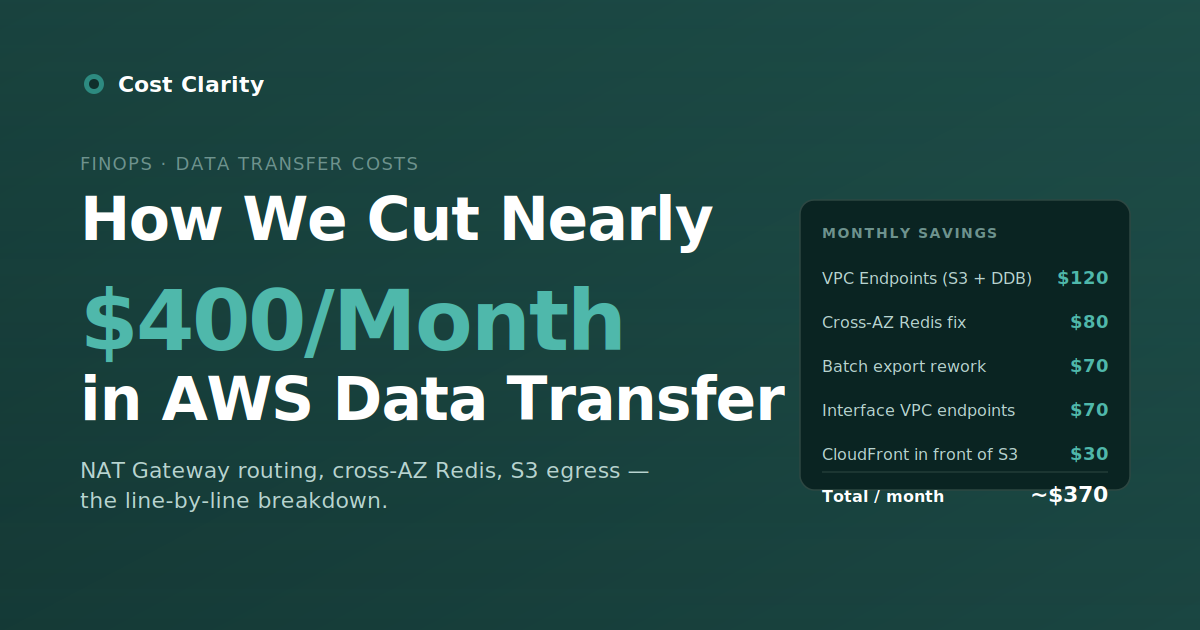
That gap between "documented" and "understandable" is where money quietly disappears. We spent half a day analyzing our AWS bill at the line-item level and found roughly $400/month of avoidable data transfer cost. Almost $5,000 a year, none of it visible in any dashboard we'd been looking at. This is the breakdown.
A prerequisite, briefly: this kind of line-item analysis is only useful if your bill carries enough metadata to attribute charges back to a service or team. If your tagging is patchy, fix that first — we wrote about that in AWS Cost Allocation Tagging: Beyond "Just Tag Everything". The rest of this post assumes you can already tell which workload generated which dollar.
Where the Money Was Going
Cross-AZ Redis Traffic: $80/Month
Cross-Availability Zone data transfer costs $0.01 per GB in each direction. That's the kind of number that feels too small to matter, until you multiply it by a service that makes millions of calls per day across an AZ boundary.
Our API servers were running in us-east-1a. Our Redis cluster's primary was in us-east-1b. Every cache read crossed AZs, and every cache read paid the cross-AZ tax in both directions. The charges showed up in the bill as EC2-Other, which is exactly the kind of catch-all category that makes investigation slow.
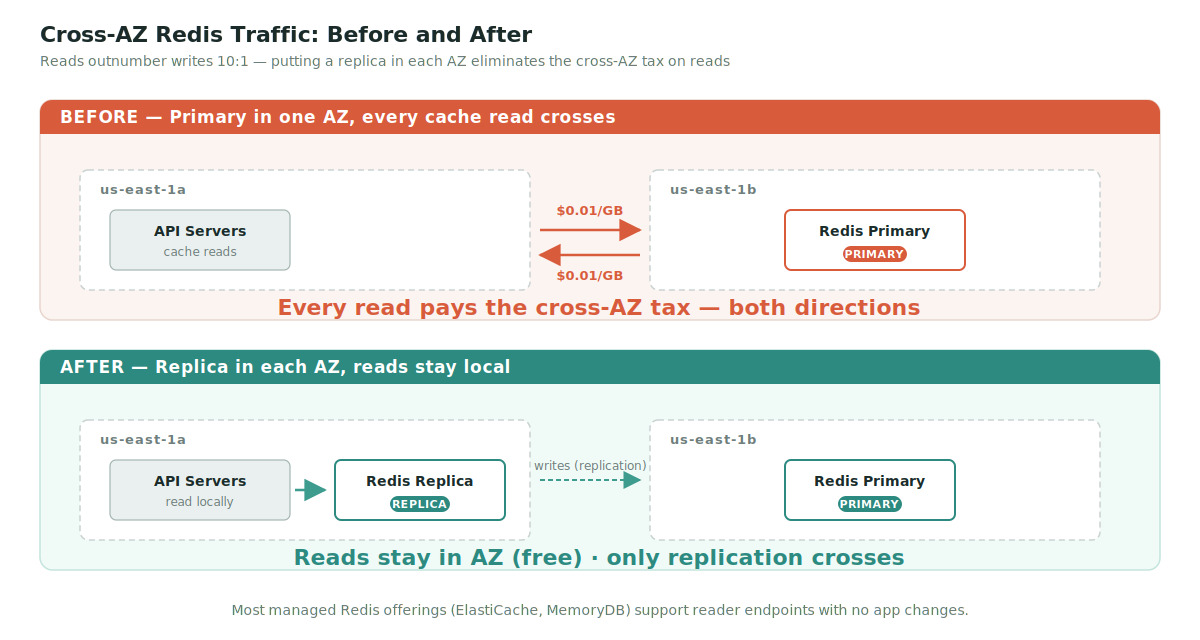
The fix: Enable a Redis replica in each AZ and configure read operations to use the local replica. Writes still cross AZ boundaries, but in a typical web application, reads outnumber writes by 10:1 or more. Most managed Redis offerings (ElastiCache, MemoryDB) support this with a configuration change, no architectural rewrite required.
Time invested: ~30 minutes. Saved: ~$80/month.
NAT Gateway Routing to AWS Services: $120/Month
NAT Gateway charges have two components: an hourly fee (~$32/month per gateway in us-east-1) and a data processing fee of $0.045 per GB. The hourly fee is unavoidable if you need a NAT Gateway. The data processing fee, in many environments, is paying for traffic that doesn't need to go through NAT at all.
We found that a meaningful share of our NAT Gateway traffic was destined for S3 and DynamoDB. Both have Gateway VPC Endpoints, which route traffic to those services over AWS's internal network without touching your NAT Gateway. The endpoints themselves are free. The data through them is free. The cost we'd been paying was pure waste.
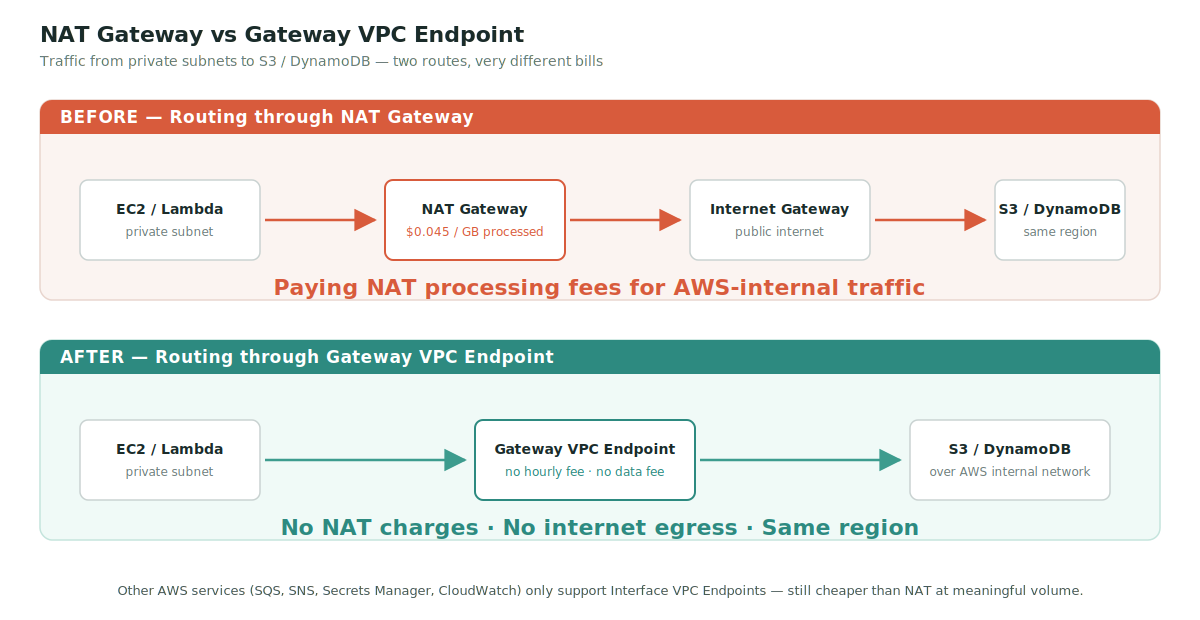
The fix: Create Gateway VPC Endpoints for S3 and DynamoDB, attach them to your route tables. No application changes required. AWS resolves the service endpoints to the VPC Endpoint route automatically.
Time invested: ~10 minutes per environment. Saved: ~$120/month.
For other AWS services like SQS, SNS, Secrets Manager, and CloudWatch, only Interface VPC Endpoints are available. These cost $0.01 per GB plus an hourly per-AZ fee, so they're not free, but for any service generating meaningful NAT traffic they're still significantly cheaper than $0.045/GB through NAT.
Action item: Open your VPC Dashboard and look at the BytesProcessed metric for your NAT Gateways in CloudWatch over the last month. Then look at which AWS services those bytes were going to. If S3 or DynamoDB is in that list, you're paying NAT processing fees you don't need to.
Direct S3 Egress vs. CloudFront: $30/Month
We were serving a chunk of static assets directly from S3 to end users, a configuration set up early in the project that nobody had reviewed. Direct S3 egress to the internet costs $0.09 per GB. CloudFront egress is $0.085 per GB, slightly cheaper, and the data transfer from S3 to CloudFront is free.
The pricing delta alone isn't dramatic, but the second-order effect is bigger: CloudFront caches at the edge, so repeated requests for the same asset stop hitting S3 at all. In practice, the cache hit ratio on static assets is high, which means the effective cost per GB delivered drops well below the headline $0.085.
The fix: Front your S3 buckets with a CloudFront distribution. Update your application to reference the CloudFront URL. About 20 minutes of work, depending on how DNS is set up. End users also get faster asset delivery, which is a real (if hard to measure) UX win.
Time invested: ~20 minutes. Saved: ~$30/month, plus performance improvements.
Batch Export Job: $70/Month
We had a batch job exporting roughly 500GB of data per month to an external partner. The job ran on EC2 and pushed the data out to the partner's API, which meant we were paying the full internet egress rate on every byte.
The fix: We restructured the workflow to a pull-based model. We write the export to an S3 bucket, expose it via CloudFront with a signed URL, and the partner pulls it. The S3-to-CloudFront transfer is free. The partner's pull from CloudFront is metered, but at CloudFront rates with caching benefits if they pull the same data multiple times.
This isn't always the right pattern. Push-to-partner makes sense when the partner has authentication requirements you can't easily implement on your CDN, or when latency requirements rule out caching. For batch exports of large flat files, pull-based is almost always cheaper.
Time invested: ~half a day, including coordination with the partner. Saved: ~$70/month.
Additional Endpoint Optimizations: $70/Month
Beyond S3 and DynamoDB, a systematic review of what was crossing our NAT Gateway turned up another ~$70/month worth of traffic that could move to Interface VPC Endpoints. The largest contributor was internal SQS and CloudWatch traffic from a high-throughput batch service.
The math on Interface VPC Endpoints is worth doing carefully: you pay an hourly fee per endpoint per AZ (~$7/month each), so they only pay back above a certain traffic threshold. For us, three services hit that threshold cleanly. For the rest, we left the traffic on NAT.
What's Actually Free on AWS
The flip side of "where am I paying for data transfer" is "where am I not paying for data transfer." Worth knowing:
- Intra-AZ traffic between EC2 instances using private IPs.
- S3 to CloudFront in the same region.
- All inbound traffic from the internet to AWS.
- Gateway VPC Endpoints for S3 and DynamoDB, including the data through them.
- The first 100 GB of monthly internet egress from AWS, across all services combined.
Designing around these is worth real money. Putting a high-traffic service in the same AZ as its dependencies saves cross-AZ fees. Routing AWS service traffic through the right VPC Endpoint type saves NAT fees. Serving public assets through CloudFront saves egress fees. None of it is exotic. It's all just architecture decisions you can make once.
AWS Egress Pricing, Tiered
For traffic actually leaving AWS to the internet:
- First 100 GB/month: free (across all services)
- 100 GB – 10 TB: $0.09/GB
- 10 TB – 50 TB: $0.085/GB
- 50 TB – 150 TB: $0.07/GB
- Over 150 TB: $0.05/GB
CloudFront has its own free tier and reduced rates at scale, which is a meaningful difference for any application serving more than a few hundred GB to end users monthly.
Regional pricing matters. The numbers above are for us-east-1. Other regions can be substantially more expensive. The São Paulo region (sa-east-1) charges $0.15/GB for internet egress and $0.02/GB for cross-AZ transfer—roughly double the US rates. Frankfurt (eu-central-1) and Sydney (ap-southeast-2) sit in between. If you're running workloads outside North America, run this analysis against your actual regional pricing before estimating savings.
How We Found It: The CUR Method
Cost Explorer is great for "what's my bill trending toward this month." It's not great for "which resource is generating these data transfer charges." For that, you need the Cost and Usage Report (CUR).
The CUR is line-item billing data, delivered to S3 daily. The two columns that matter for this analysis:
lineItem/UsageType— contains values likeDataTransfer-Out-Bytes,USE1-USE2-AWS-In-Bytes,NatGateway-Bytes. Filter onDataTransfersubstring and you've isolated the universe of charges to investigate.lineItem/ResourceId— the actual ARN or ID of the resource that generated the charge.
Query it with Athena, sort by cost descending, and the top 10 line items usually account for 80%+ of the data transfer bill. That's where the optimization opportunities live.
The full half-day exercise: download the CUR, query it with Athena, identify the top contributors, map them back to architecture decisions, fix the obvious ones. The hard part isn't the analysis—it's making time to do it before the next sprint starts.
Where to Start in Your Environment
If you haven't audited data transfer costs in the last six months, the odds of finding meaningful waste are high. A practical starting sequence:
- Pull your CUR for the last 90 days and filter
lineItem/UsageTypefor substrings containingDataTransferandNatGateway. Sort by cost descending. - Audit NAT Gateway traffic. Open CloudWatch, look at
BytesProcessedper gateway, and identify which services those bytes are going to. Anything to S3 or DynamoDB → Gateway VPC Endpoint, immediately. - Look at cross-AZ patterns for high-frequency services: caches, databases, queues. Replicas in each AZ are usually cheaper than the cross-AZ traffic.
- Check direct S3 egress. If you're serving public content from an S3 bucket without a CDN in front of it, fix that.
- Review batch jobs that move data externally. Pull-based architectures, where feasible, almost always cost less.
Conclusion
AWS data transfer costs are opaque, but they're not unfixable. Most of what we found was bad routing decisions made early in the project that had compounded as traffic grew. None of the fixes were architectural rewrites. The most expensive change was half a day, and the rest were under an hour each.
The hard part isn't the work. It's noticing the work needs to happen, before the bill grows large enough to demand attention. Continuous visibility into where data transfer is happening matters more than any one optimization—because the bill that's hidden today is the one that surprises you next quarter.
TL;DR
We cut roughly $400/month in AWS data transfer costs through five changes, most of which took under an hour:
- $80 — Redis replicas per AZ, eliminate cross-AZ reads.
- $120 — Gateway VPC Endpoints for S3 and DynamoDB, bypass NAT processing fees.
- $30 — CloudFront in front of S3 for static asset delivery.
- $70 — Batch export converted from push to pull via CloudFront.
- $70 — Additional Interface VPC Endpoints for high-traffic AWS services.
The method: Download the Cost and Usage Report, filter lineItem/UsageType for DataTransfer and NatGateway substrings, sort by cost descending, fix the top contributors. Half a day of work, ~$5,000/year recurring savings.
Regional note: Pricing above is for us-east-1. Regions like sa-east-1 charge roughly 2x for both internet egress and cross-AZ transfer. Run the math against your region.
Prerequisite reading: This kind of analysis only works if your bill is attributable. If you haven't nailed down tagging yet, start with AWS Cost Allocation Tagging: Beyond "Just Tag Everything".