
The Complete Guide to AWS Credits in 2026: What Actually Works
Every program that gets you AWS credits in 2026—what amount, what it takes to qualify, and the application mistakes that cause automatic rejection. Plus the part most guides skip: how not to burn through your credits blindly.
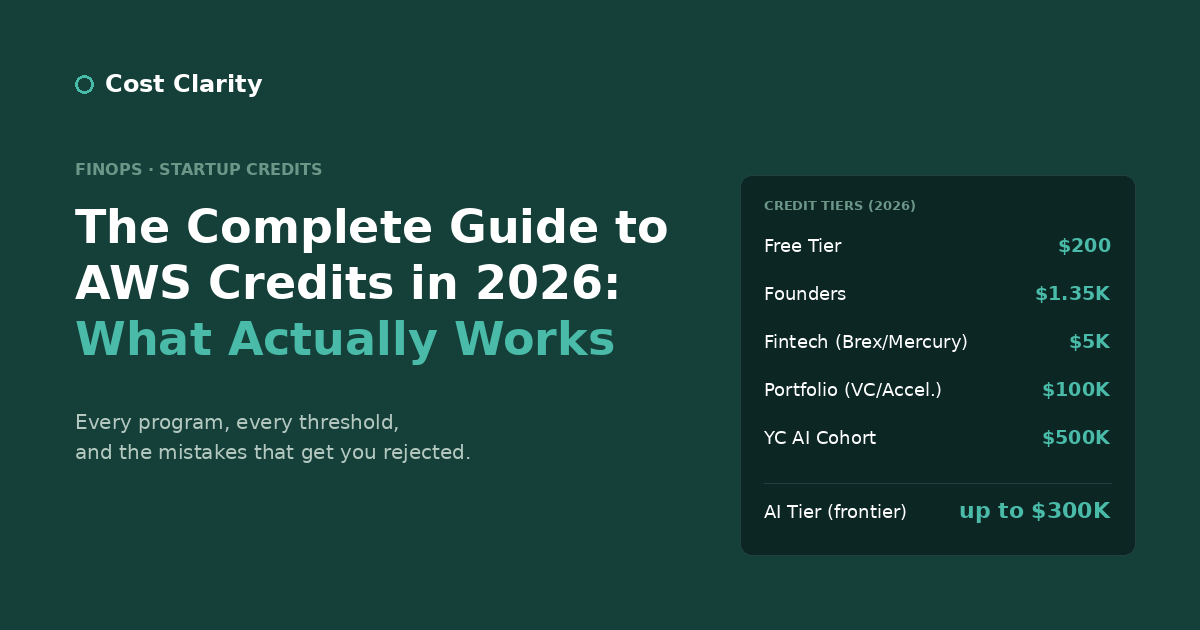
AWS credits can take a meaningful slice off your infrastructure costs in the early stages of building a startup. The catch is that most online guides about AWS credits are either out of date, vague about what actually qualifies you, or written as affiliate marketing for the providers behind one specific path. We went through several of these programs while building on AWS, and the consolidated picture below is what we wish someone had given us at the start.
There's also a second part most guides skip entirely: what happens after the credits arrive. Founders routinely treat AWS credits like free money with no expiration consequence and burn through $5,000 or $25,000 without ever understanding what they spent it on. By the time the credits run out and real invoices show up, the architecture decisions that drove those costs are already baked into production. We'll cover both halves.
AWS Credit Programs at a Glance
| Program | Amount | Key Requirement | Time to Apply |
|---|---|---|---|
| Enhanced Free Tier (post-July 2025) | $200 | New account creation | Automatic |
| AWS Activate Founders | $1,000 + $350 support | Bootstrapped + company domain + real website | ~20 min |
| Fintech route (Brex / Mercury) | $5,000 | Business banking account + provider's card as default payment | ~15 min |
| AWS Activate Portfolio | $25,000–$100,000 | VC or accelerator org ID | ~30 min |
| AWS Activate AI Tier | up to $300,000 | Frontier AI startup, AWS approval | Varies |
| Y Combinator | $100,000–$500,000 | YC acceptance | — |
| YC Startup School | $2,500 | Free program enrollment | ~30 min |
| Nonprofit (via TechSoup) | $1,000–$5,000/yr | Nonprofit registration | Varies |
Numbers reflect program structures as of February 2026. AWS adjusts these periodically, so verify current details on the relevant program page before planning around any specific amount.
The Enhanced Free Tier (2025 Update)
AWS restructured its Free Tier in mid-2025. For accounts created after July 15, 2025, the structure now includes:
- $100 in automatic credits on account creation
- An additional $100 unlocked by completing five qualifying activities (each worth $20): launching an EC2 instance, an RDS database, a Lambda function, an AWS Budget, and a Bedrock interaction
- Trial period: 6 months (down from the previous 12), or until you've used the $200 in credits—whichever comes first
- Credit expiration: the credits themselves expire 12 months after issuance
This is meaningfully better than the old indefinite-but-narrow Free Tier for prototyping and early development, but the shorter 6-month window means you should plan accordingly. Verify current details at aws.amazon.com/free.
AWS Activate Founders: $1,000 + $350 Support
The most accessible tier. Apply directly at aws.amazon.com/startups. The full package is $1,000 in AWS credits plus $350 in AWS Developer Support credits, valid for 2 years.
Eligibility:
- Self-funded or pre-Series B (latest funding round, if any, within the last 12 months)
- Company founded within the last 10 years
- Fewer than 10 employees
- AWS account on a paid plan (not just Free Tier)
- Professional company website with real content
- Not previously a recipient of AWS Activate credits
- Not currently affiliated with an AWS Activate Provider (VC or accelerator)—if you are, you go through Portfolio instead
The two mistakes that cause most rejections:
- Generic email address. Apply from your company domain, not Gmail or Yahoo. The automated checks flag generic email domains for additional review and frequently auto-reject them.
- Placeholder website. "Coming soon" pages, single-page sites with no product description, or sites that look like a domain parking page will trigger automatic rejection. Have substantive content describing what you actually do before you apply.
These are both fixable in a day, and both are responsible for a disproportionate share of rejections we've seen.
The Fintech Route: $5,000
One of the fastest paths to meaningful AWS credits in 2026 runs through fintech business banking. Several modern banking providers, including Brex and Mercury, are official AWS Activate Providers. Their customers can apply for AWS credits directly through the partnership.
The mechanism: once you have a business account with the provider, you apply through AWS Activate Portfolio using the provider's organization ID, which they typically expose in their perks or startup programs section.
Requirements that actually matter:
- Default payment method. Your AWS account must list your fintech provider's card as the default payment method before you submit. Applications with a different default payment method get rejected, and the rejection isn't always informative about why.
- Company age: under 10 years old.
- Previous AWS credits: see "No Double-Dipping" below.
- Processing time: credits typically arrive within a week and remain valid for 12 months from issuance.
This is one of the highest-leverage paths because the application takes about 15 minutes once you have the banking relationship in place.
A note on AWS Business Support. If your Activate package includes Activate Business Support Credits (Founders includes $350, Portfolio can include up to $10,000), AWS will automatically enroll your account in Business Support+ when your credits are issued—you don't need to manually upgrade to a paid support plan beforehand. The support credits cover the support plan fees during the credit period. When the credits are exhausted or expire, the account reverts to Basic Support unless you choose to keep paying for support. Note that AWS Business Support stopped accepting new subscriptions on December 2, 2025, and was replaced by Business Support+ (with a lower $29/month minimum).
AWS Activate Portfolio: $25,000–$100,000
The Portfolio tier is where the meaningful credit allocations live. Access requires a connection to an AWS Activate Provider, which includes most VCs and startup accelerators.
How to access:
If you've raised funding or participated in an accelerator, contact your investor or program admin directly. Many VCs and accelerators are AWS Activate Providers but don't proactively advertise this benefit to portfolio companies. Ask them for their AWS Activate organization ID. Apply through the same AWS Activate flow, providing that ID.
Timing matters. There's typically a 12-month window after your funding round to apply for Portfolio credits. This is enforced strictly. If you raised eight months ago and haven't applied yet, do it this week.
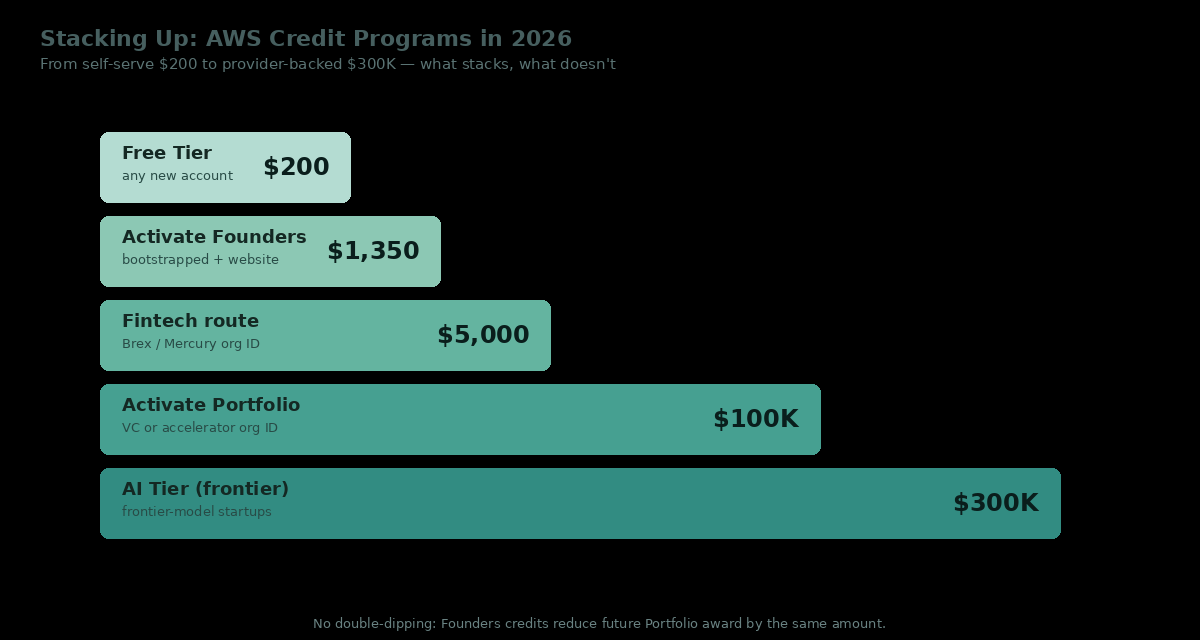
No Double-Dipping. This is the rule most stacking guides skip. If you previously received Founders credits, your Portfolio award is reduced by the amount you already received—you don't get the full Portfolio amount on top. Practically, this means stacking goes Free Tier → Founders → (eventually) Portfolio, and the Portfolio amount you actually receive is the difference. The fintech route ($5,000) is structurally similar to a small Portfolio award, so the same reduction logic applies.
AWS Activate AI Tier: up to $300,000
New for 2025/2026: AWS introduced a dedicated AI Tier for frontier-model startups. Awards can reach up to $300,000 in credits, typically usable across Bedrock, SageMaker, and EC2 (including reserved GPU capacity for training workloads). Eligibility is reviewed case-by-case and requires AWS approval, with priority going to startups building foundation models or large-scale AI infrastructure on AWS.
If you're a generic SaaS startup that uses AI features, this tier is not for you—Portfolio is the right path. If you're training your own models or running serious GPU workloads, ask your AWS account manager about it specifically.
Accelerator Programs: $100,000+
Top-tier accelerators offer the largest credit packages. Y Combinator is the most generous and the most public:
- $100,000 standard allocation for participating startups
- Up to $500,000 for AI-focused startups, delivered through Bedrock, SageMaker, and reserved H100 capacity
- $2,500 even through YC's free, online Startup School (open to anyone)
Other major accelerators offer comparable benefits, with allocations varying by program. The pattern is consistent: if you're going through any structured accelerator, ask about AWS credits as part of onboarding. The provider relationship is usually already in place; you just have to claim it.
Nonprofit and Research Credits
Nonprofit organizations with proper registration can receive $1,000–$5,000 annually through TechSoup's AWS program. This is recurring, which makes it valuable over time.
Research institutions and academic projects have access to specialized AWS credit programs, with allocations depending on project scope and institutional partnerships. The AWS Cloud Credit for Research program is the standard entry point.
What Doesn't Work
What to avoid is as important as what to pursue:
Terms of Service violations:
- Don't buy credits from third-party brokers. Direct violation of AWS Terms of Service. Buyer accounts get suspended.
- Don't create multiple AWS accounts to stack Founders credits. AWS tracks eligibility at the company level, not the account level. The credits won't apply, and you'll have created a multi-account audit problem for yourself.
Structural mistakes:
- Don't start with a personal AWS account and convert it later. Conversion creates billing and identity complications that take time to unwind. If you're building a company, start with a business account.
- Don't delay Portfolio applications after funding. The 12-month window doesn't extend.
The Part Nobody Talks About: Don't Burn Through Credits Blindly
This is where most startup guides stop. It's also where most founders make their most expensive mistake.
Credits create a useful illusion: your AWS bill is $0, so everything feels fine. The architectural choices you make during your credit period become the foundation of your production infrastructure. When credits expire (typically 12–24 months after they're granted, depending on the program), those same patterns generate real invoices. They can be substantial.
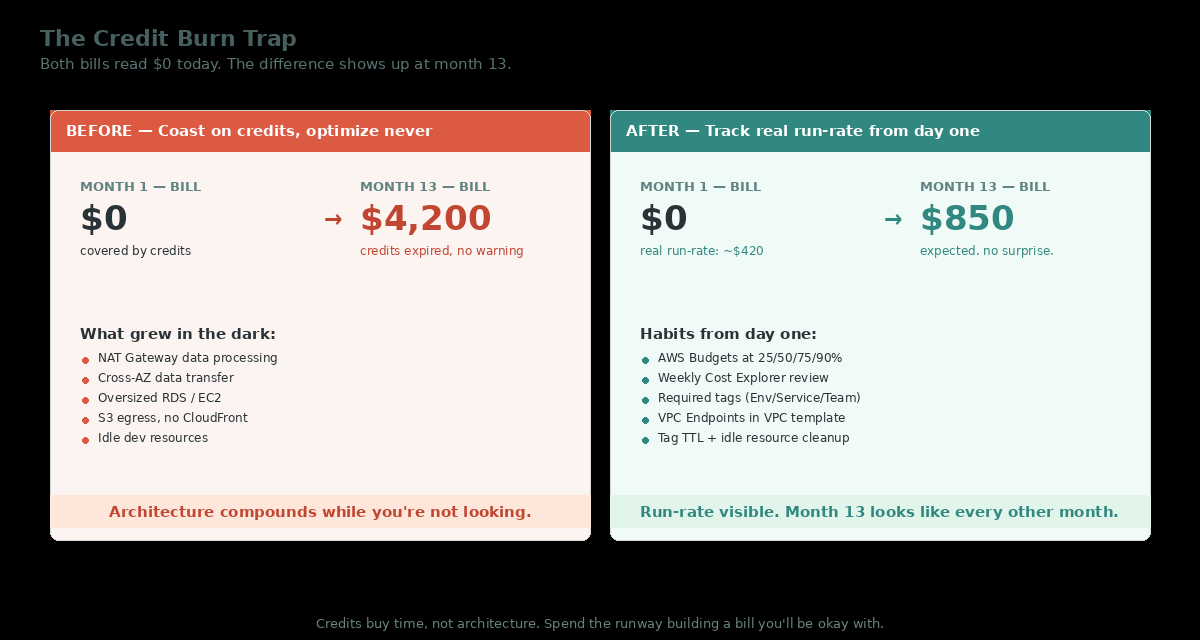
The most common ways founders burn through credits faster than expected:
- NAT Gateway data processing fees that accumulate quietly as traffic grows.
- Cross-AZ data transfer between services deployed across multiple Availability Zones, often unintentionally.
- Oversized EC2 or RDS instances chosen for headroom during development, never right-sized for actual production load.
- S3 egress costs from serving assets directly instead of through CloudFront.
- Idle resources left running between development sessions: dev databases, debug instances, test load balancers.
None of these are obvious from the AWS console billing summary. The summary tells you the total. The Cost and Usage Report tells you which resource generated which line item, which is what you actually need. We wrote up the exercise of going through a CUR line-by-line in How We Cut Nearly $400/Month in AWS Data Transfer Costs—every one of those wasted line items would have been invisible during a credit period and a surprise afterward.
The practical advice:
- Set up AWS Budgets with alerts on day one, with the credit period explicitly modeled. Set thresholds at 25%, 50%, 75%, and 90% of expected monthly run-rate. The credits cover the cost; the alerts train you to recognize what your infrastructure actually costs.
- Look at your bill weekly. Not the dashboard. The actual line items in Cost Explorer, grouped by service. Five minutes a week. The point isn't to react to every fluctuation—it's to have an intuition for what "normal" looks like for your stack, so anomalies stand out.
- Tag your resources from the start.
Environment,Service,Team. When you can't make sense of a line item six months in, the tags are how you reconstruct what was running. We wrote about getting this right in AWS Cost Allocation Tagging: Beyond "Just Tag Everything". - Treat the credit-expiration date as a hard deadline. A $25,000 Portfolio credit allocation feels like comfortable runway. A poorly architected application with unoptimized data transfer and NAT Gateway usage can burn through that in 4–6 months. If you don't know your unit economics on AWS by month 9, you're gambling on month 13.
The founders who get the most value from AWS credits aren't the ones who maximize their credit haul. They're the ones who use the credit period to build cost-efficient architecture and arrive at month 13 with infrastructure they can actually afford to keep running.
Recommended Sequence for Early-Stage Startups
A practical order of operations:
- Open a fintech business account (Brex or Mercury) if you don't already have one. The banking relationship has independent value beyond the credits.
- Apply through their AWS Activate partnership for $5,000 in credits.
- Apply for AWS Activate Founders for an additional $1,000 + $350 support (only if you haven't already received Activate credits—remember the no-double-dipping rule).
- Talk to your investors or accelerator program to access Portfolio tier ($25,000–$100,000) through their organization ID, while you're inside the 12-month window. Your Portfolio award will be reduced by whatever you already received through Founders or Fintech routes.
- Set up AWS Budgets and tagging from day one, before you start spending the credits.
Done in sequence, this can unlock $30,000+ in credits within a few weeks, and—more importantly—position you to use that runway productively rather than burning through it on inefficient architecture.
TL;DR
- Enhanced Free Tier: New accounts post-July 2025 get $200 automatically. 6-month trial window, credits expire 12 months after issuance.
- Founders tier: $1,000 + $350 support credits, 2-year validity. Bootstrapped or pre-Series B only; not for VC/accelerator-affiliated startups.
- Fintech route: Brex or Mercury → $5,000 through their AWS Activate partnership.
- Portfolio tier: Ask your VCs or accelerator for their AWS Activate organization ID → $25,000–$100,000, within 12 months of funding.
- AI Tier: Frontier AI startups can access up to $300,000 across Bedrock, SageMaker, and reserved GPU capacity.
- Accelerators: YC offers $100K standard, up to $500K for AI cohorts. Other programs vary—ask during onboarding.
- No double-dipping: Founders credits reduce your future Portfolio award by the same amount. Plan the sequence accordingly.
- AWS Business Support+: Auto-enrolled when your Activate package includes support credits. The legacy Business Support tier stopped accepting new subscriptions December 2, 2025.
- What to avoid: broker-purchased credits (ToS violation), multiple accounts to stack Founders credits, delayed Portfolio applications.
- Most importantly: Monitor your costs from day one, even on credits. The architecture decisions you make now are the invoices you'll pay later.